
What makes VOSTORQ different
Spaces, topics, and durable knowledge.
VOSTORQ organizes discussions, decisions, and context into durable spaces and focused topics — so teams can find the work, understand the history, and keep knowledge connected.
Workspace
The organization-level environment where your team creates, organizes, and accesses company knowledge.
Spaces
Durable areas for teams, initiatives, projects, functions, or long-running work.
Topics
Focused places for specific discussions, decisions, files, updates, and context — preserving the knowledge behind the work.
Want to see how VOSTORQ fits your team?
Request a walkthrough
Workspaces
The company-level environment for structured knowledge.
A VOSTORQ workspace is the organization-level environment where your team creates, organizes, and accesses company knowledge.
It gives the company a clear place for the people, permissions, structure, and long-running work that should remain understandable over time.
Instead of spreading important context across private inboxes, chat history, meeting notes, documents, and folders, the workspace gives your team a common environment for organizing the work that still matters later.
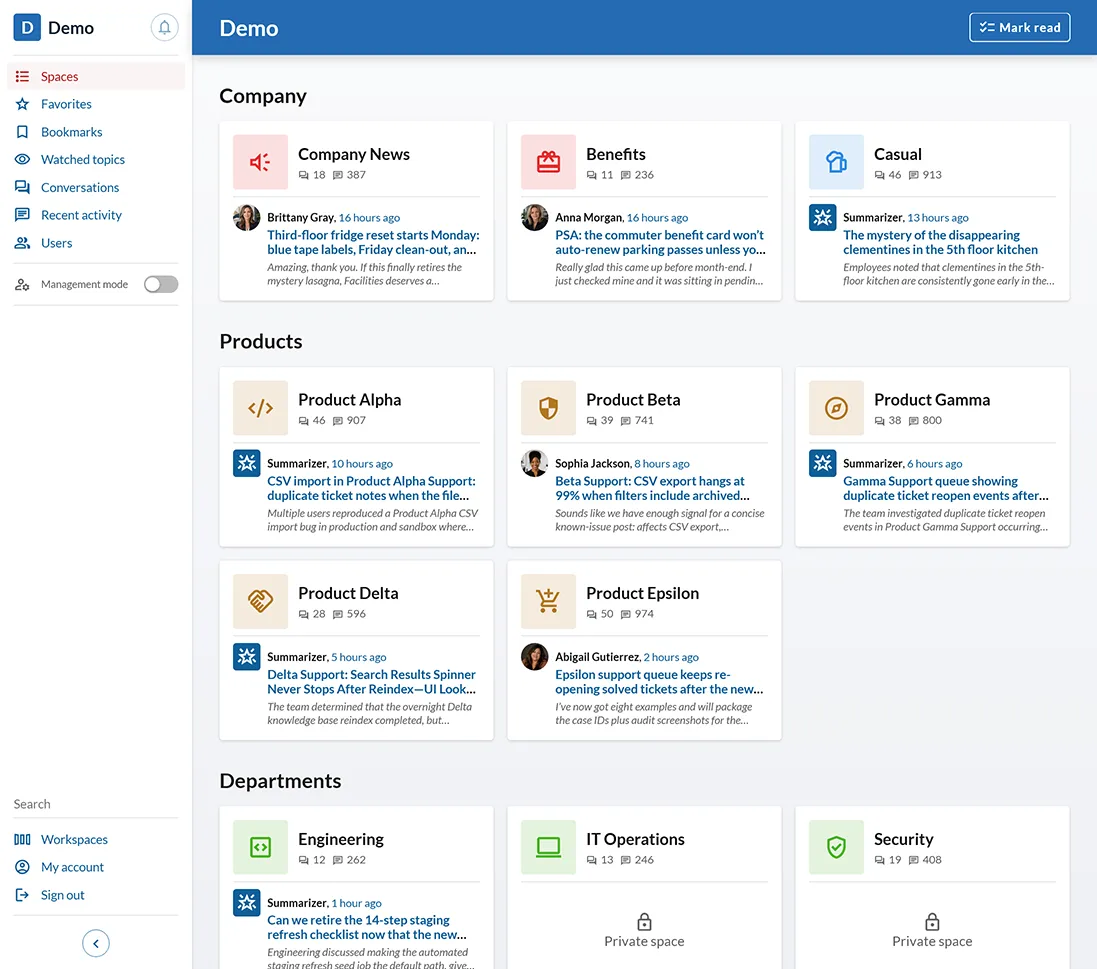
At the workspace level
Organization environment
A company-level layer for the people, structure, and knowledge connected to your work.
Users and access
A place to manage who participates and how people access the work inside the organization.
Workspace structure
The foundation for organizing durable areas of work as the company grows.
Navigation starting point
A reliable place for teammates to begin when they need context, history, decisions, or related work.
Company knowledge layer
The environment where important work can become easier to find, understand, and revisit.
Spaces
Durable areas for the work your team keeps returning to.
Spaces are long-lived areas inside the workspace. They can represent teams, initiatives, customers, functions, strategic areas, or recurring work.
Spaces give meaningful areas of work a long-lived home, so the company does not have to rebuild context every time the conversation resumes.
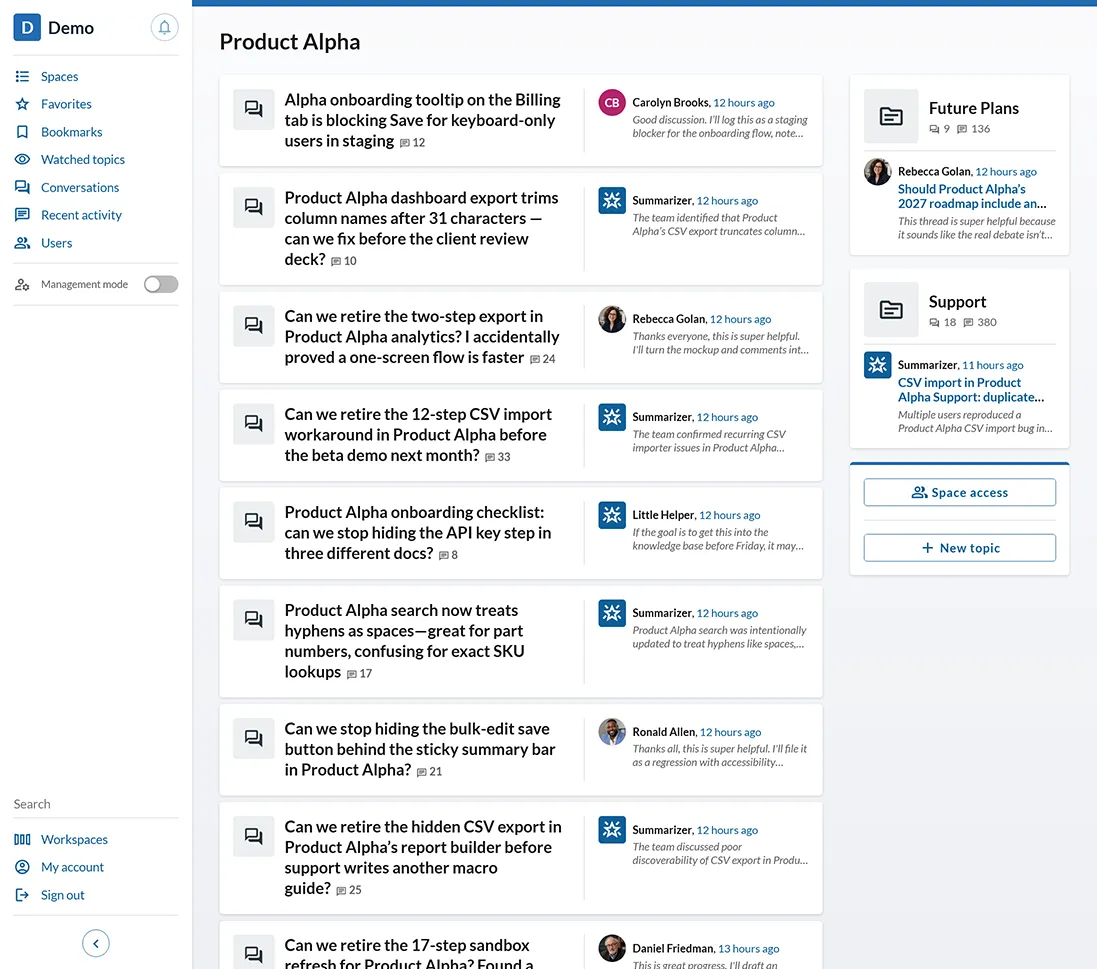
All kinds of Spaces
Product Strategy
Roadmap debates, pricing discussions, positioning work, customer feedback, launch planning, and product decisions.
Engineering Architecture
Technical proposals, RFCs, architecture decisions, incident follow-ups, infrastructure tradeoffs, and system context.
Founder Operations
Fundraising, hiring, company priorities, leadership discussions, internal policies, and operating cadence.
Support Learnings
Recurring customer issues, product gaps, resolution patterns, internal explanations, and follow-up decisions.
Launch Planning
Messaging, release coordination, customer communication, risks, dependencies, and post-launch learnings.
Topics
One focused place for each discussion, decision, or problem.
Topics are the core unit of VOSTORQ.
A topic is a focused place for a specific discussion, question, proposal, problem, decision, customer situation, or recurring area of knowledge.
Inside a topic, the relevant pieces stay together: the discussion, the decision, the files, the updates, and the context around the work. That gives the team a clearer record of what happened, what changed, what was decided, and what still needs attention.
Topics help teams avoid the usual split between where the conversation happened, where the file was stored, where the decision was written down, and where someone later tries to reconstruct the history.
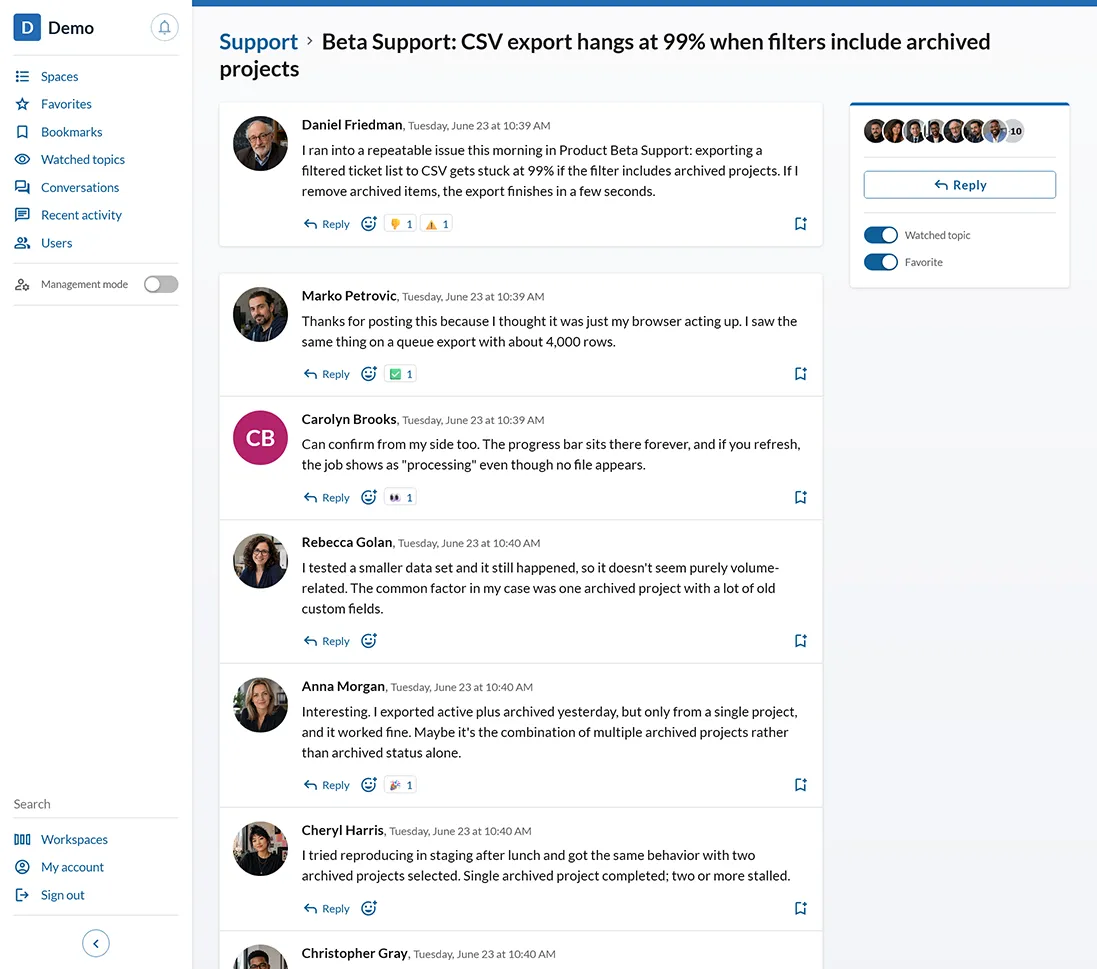
Topics can cover everything
Product
- Should we launch usage-based pricing?
- Q3 roadmap tradeoffs
- Homepage positioning review
- Customer feedback from beta users
Engineering
- Authentication architecture proposal
- Incident follow-up: delayed email delivery
- API versioning decision
- Database scaling options
Operations
- Hiring plan for customer success
- Weekly leadership priorities
- Vendor evaluation for analytics
- Internal policy update
Customer-facing work
- Enterprise onboarding blockers
- Support patterns from the last 30 days
- Escalation: account renewal risk
- Customer implementation notes
Founder workflows
- Fundraising narrative
- Investor questions and answers
- Company operating principles
- Strategic bets for the next six months
AI Agents
AI can participate where the context already lives.
VOSTORQ lets teams create AI Agents inside the workspace and bring them into the flow of discussion.
Agents can be configured with specific instructions and a chosen level of engagement. They can be activated manually, invoked when a topic is created, or triggered when someone replies.
Because Agents participate inside the topic structure, they do not depend on people copying context into a separate AI chat. They can work from the discussion, decisions, updates, and surrounding context already connected to the topic.
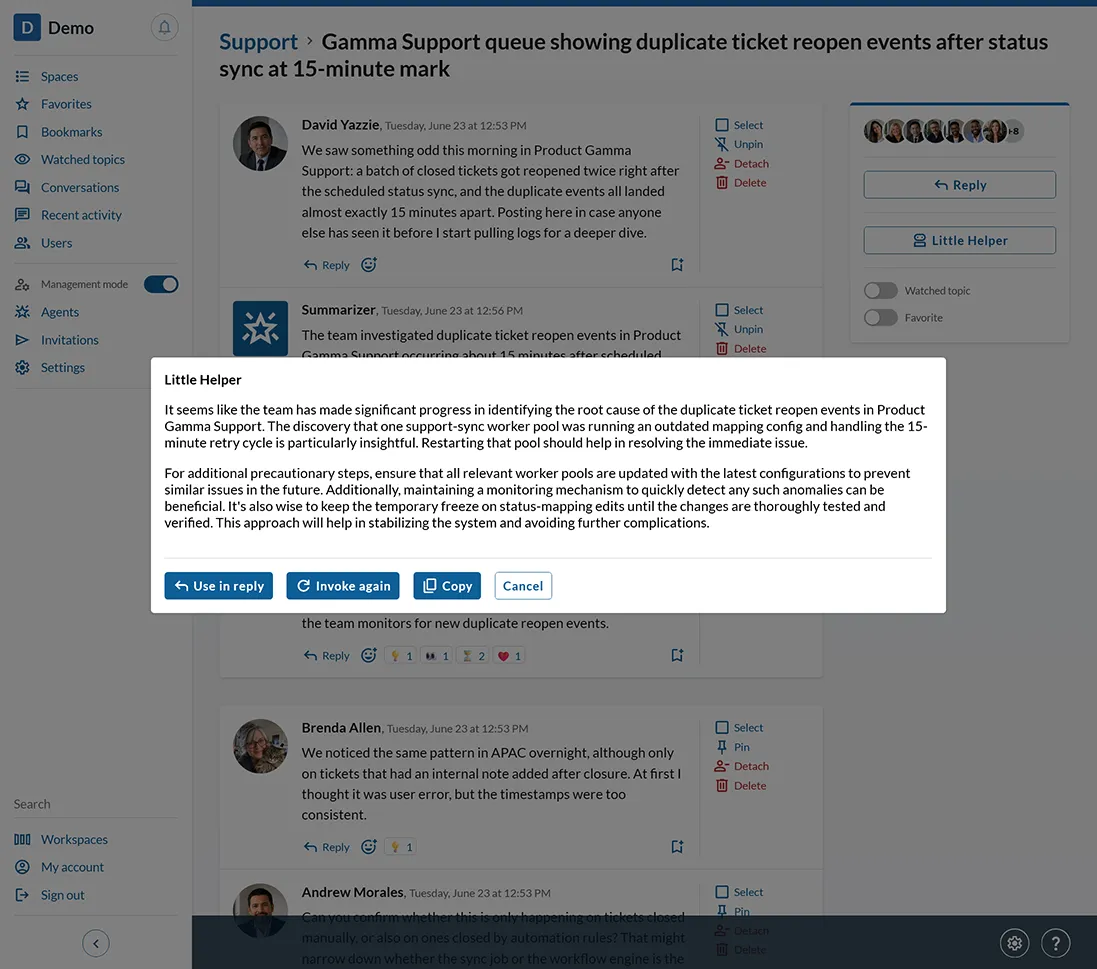
What Agents can help with
Shape the discussion
Suggest angles, missing questions, risks, tradeoffs, or follow-up points while the topic is active.
Summarize progress
Help keep a topic understandable as the discussion grows.
Support decisions
Identify open questions, alternatives, constraints, and possible next steps.
Add useful context
Bring relevant information into the conversation when it helps the team move forward.
Participate at the right level
Configure Agents to stay quiet, contribute occasionally, or engage more actively depending on the purpose of the space or topic.
Search and discovery
Give important knowledge a path back.
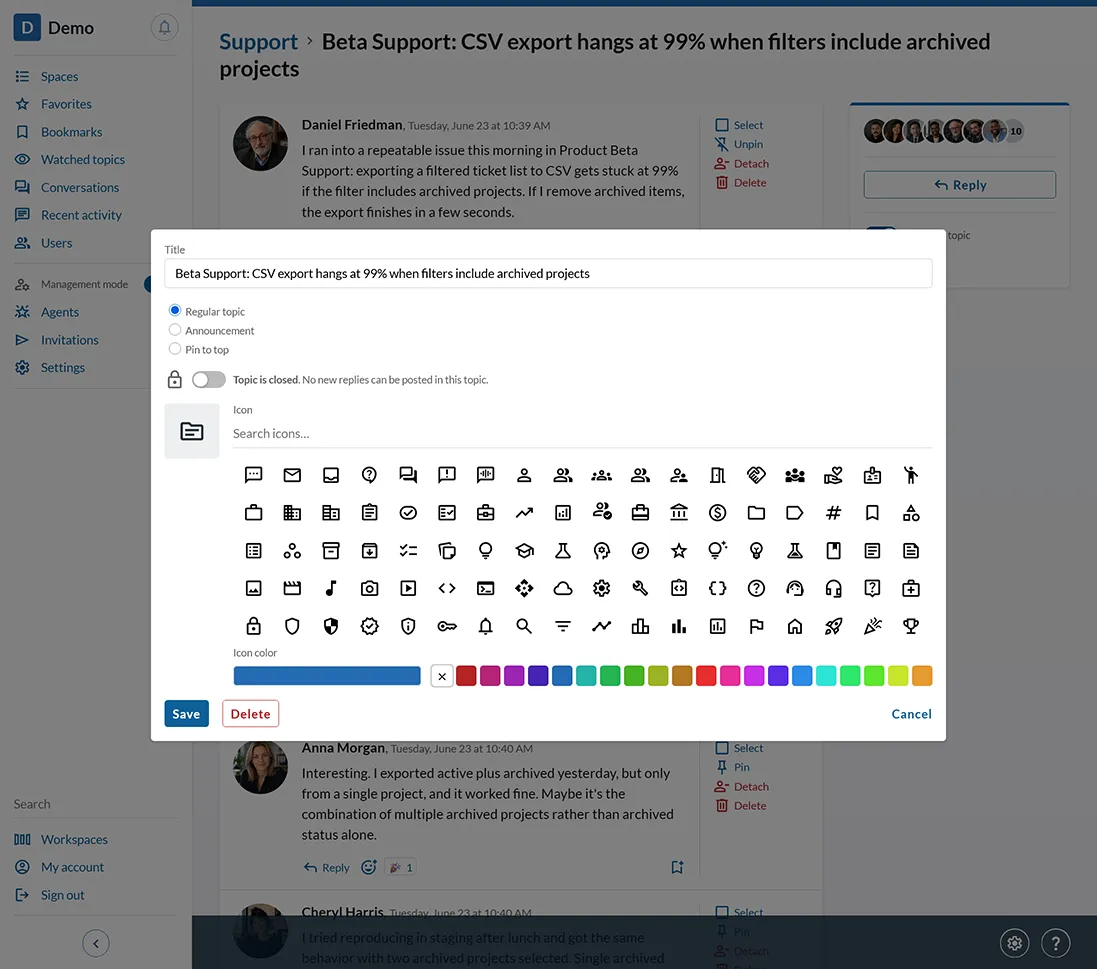
VOSTORQ gives teams multiple ways to return to important knowledge: browse by Space, search across Topics, follow marked updates, watch what matters, save important Messages, and keep critical Topics visible.
Some context is important for everyone. Some is important only to one person. VOSTORQ supports both — with workspace-level signals like announcements, and personal signals like favorites, watched Topics, and message bookmarks.
The result is a workspace where people do not have to rely only on memory, private notes, or asking around. Important context has structure, visibility, and a path back to it.
Ways to return to what matters
Browse by Space
Start from the area of work: product strategy, engineering architecture, customer onboarding, operations, or any Space your team creates.
Search across Topics
Look for discussions, decisions, updates, files, and context across the Topics in your workspace.
Mark what matters
Use signals like announcements to make important Topics visible at the workspace or team level.
Follow important Topics
Favorite or watch Topics that matter to your work, so you can return to them and stay aware as they develop.
Bookmark Messages
Save specific Messages when a detail, decision, explanation, or update needs to be easy to find later.
Connected context
The full story should not be scattered.
VOSTORQ brings the pieces of important company communication into one structured workspace: the discussion, the decision, the files, the updates, the reasoning, and the outcome.
Instead of leaving your team with fragments to interpret later, VOSTORQ keeps the context around meaningful work intact. People can return to a topic, understand how the thinking developed, see what changed, and continue from the current understanding.
That is how everyday communication becomes company knowledge your team can actually use.
Want to see how VOSTORQ fits your team?
Request a walkthrough